Users
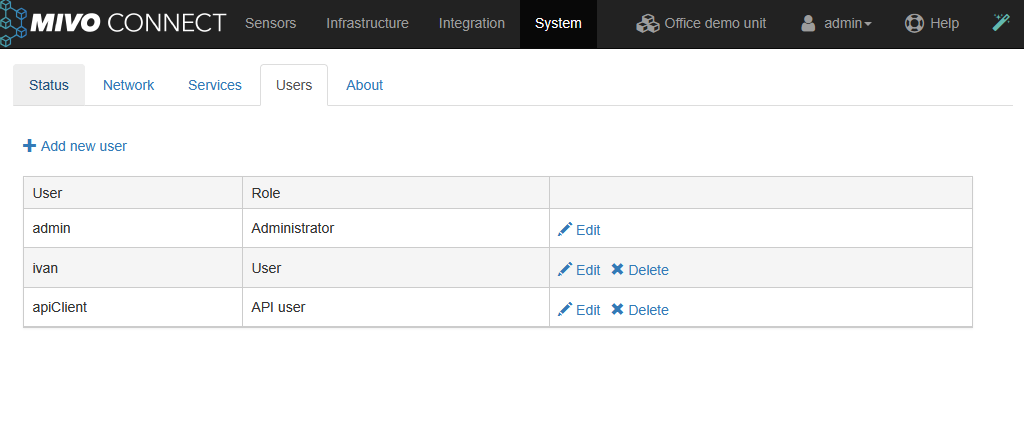
MIVO Connect supports multiple types of users.
There are two types of users:
- Normal users
- API users
Normal users#
Normal users are "human users" that can log in using a standard web-based login.
There is a default user called admin with administrator privileges. This user cannot be removed.
User roles#
We support multiple users with two roles:
- Administrator
- User
Role differences#
Administrator
- Can create and delete other users
- Has full access to user management
User
- Can only view and edit their own account
- Cannot manage other users
More granular roles and permissions are currently under development.
API users#
API users are intended for system-to-system communication and are not associated with interactive (human) use.
They authenticate using OAuth2 with the private_key_jwt client authentication method to obtain a Bearer token, which is then used when calling the API.
API users: - Cannot log in via the web interface - Represent applications or external systems - Are used exclusively for API access and integrations - Authenticate by generating a signed JWT and exchanging it for an access token
Authentication#
API users obtain an access token via the /api/token endpoint.
This requires:
- grant_type=client_credentials
- A client_id
- A signed JWT (client_assertion) using the client’s private key
The issued token:
- Is a Bearer token
- Contains the role APIUser
- Must be included in API requests using the Authorization header
API capabilities#
API users interact with the system through a REST API focused on sensor data and control.
Available operations include:
-
List active sensors
GET /api/MivoAPI/v1/ListActiveSensors
Returns all sensors with a valid license -
Read sensor data
POST /api/MivoAPI/v1/ReadSensor/{uid}
Retrieves values and status information for a specific sensor -
Write sensor values
POST /api/MivoAPI/v1/WriteValues
Writes one or more values to sensors (e.g. setpoints or configuration)
All endpoints: - Require a valid Bearer token - Use JSON request and response formats
Sensor data model#
Sensors are identified by a unique UID and expose multiple values such as:
- Temperature
- Energy consumption
- Flow and volume
- Voltage, current, and power
- Status and error codes
Sensor readings include: - A timestamp - A result/status code - A list of measured values - Optional status or alarm indicators
API documentation (Swagger)#
All endpoints and data models are documented via Swagger (OpenAPI), available at:
http://<device-hostname-or-ip>/swagger