Guide: Configuration of Multi-Hop Routing Between Two Lansen Repeaters#
This guide explains how to configure two or more repeaters so that data is forwarded in a chain:
Sensor → Repeater 2 → Repeater 1 → MIVO unit
This routing guide is used only when one repeater must forward data to another repeater.
If the repeater communicates directly with the MIVO unit, no additional routing settings are required.
Requirements#
To perform the configuration, you need:
- Lansen Configurator
- Lansen configuration dongle (LAN-WMBUS-D1_TC)
- Serial number (ID) of both repeaters
The ID can be found on the device label:
The eight X digits represent the repeater’s ID.
Step-by-Step Instructions#
1. Start the software#
Open Lansen Configurator and connect the dongle to your computer.
2. Enter the repeater ID#
In the Configure Repeater/Bridge ID field, enter the repeater ID
(the eight digits from the label).
Configuration of Repeater 1 (REP1 – closest to MIVO)#
REP1 is the repeater that forwards data directly to the MIVO unit.
It must therefore receive data from the repeater located further away (REP2).
Go to the Routing tab and configure:
-
Next Hop Repeater:
(leave empty – REP1 sends directly to MIVO) -
Retransmit Repeater 1:
Serial number of REP2
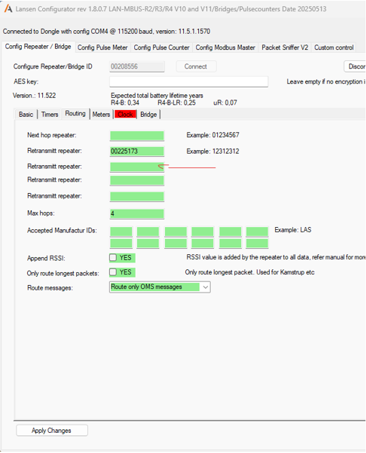
- Max hops:
4
REP1 is now configured.
Configuration of Repeater 2 (REP2 – furthest from MIVO)#
REP2 must forward all incoming data via REP1.
Go to the Routing tab and configure:
-
Next Hop Repeater:
Serial number of REP1 -
Retransmit Repeater:
(leave empty – REP2 has no repeater behind it) -
Max hops:
4
Result#
Sensor → REP2 → REP1 → MIVO